
There are two locations where this can be done. You can add joint signers before the session starts and during the live session.
Adding Joint Signers Before the Session Starts
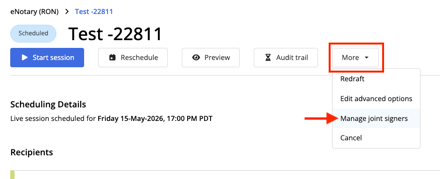
Step 1: On the session's main page, select More and then Manage joint signers.
Step 2: Select the blue person icon next to the signers' names who need to be part of the joint group. If they're part of the group their line will be highlighted gray and their button will turn white.
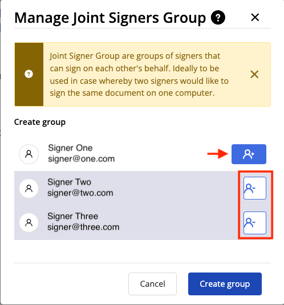
You can remove a signer from the group by selecting the white button.
Step 3: Select Create group when you've chosen everyone.
Adding Joint Signers During the Live Session
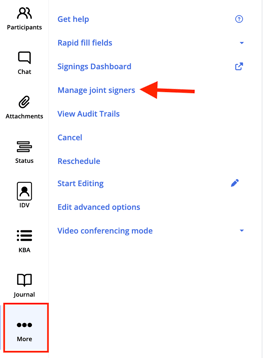
Step 1: In the session, select More. Then select Manage joint signers.
Step 2: Select the blue person icon next to the signers' names who need to be part of the joint group. If they're part of the group their line will be highlighted gray and their button will turn white.
You can remove a signer from the group by selecting the white button.
Step 3: Select Create group when you've chosen everyone.