
Logging In
- Log in on the Snapdocs login link (app.snapdocs.com): Will take you to your Notary Connect account
- Log in on Snapdocs RON login (signings.snapdocs.com): You will not be able to log in (see ‘Signing up for Snapdocs RON’ below).
- Log in from Snapdocs website (snapdocs.com login button): Will take you to your Notary Connect signings.
Signing Up for Snapdocs RON
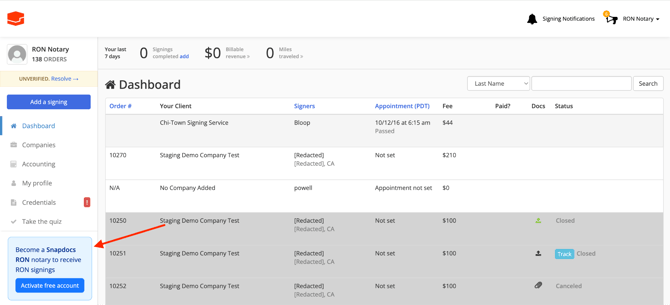
- Sign up for Snapdocs RON from within Notary Connect: If you don’t have a linked account, you will see a button on the left-hand side of your Notary Connect dashboard to create a free linked Snapdocs RON account.
Navigation Across Platforms
Navigate to Snapdocs RON from Notary Connect: You will not be able to navigate to Snapdocs RON until you have created a Snapdocs RON account with the same email address.