
Logging In
- Log in from the Signing Agent login link (app.snapdocs.com) to access your Notary account in Snapdocs Notary Connect.
- Log in from the Snapdocs RON login link (signings.snapdocs.com) to access your Snapdocs RON account.
- If you log in from the Snapdocs website (snapdocs.com), you will have access to both accounts. You can switch between your Notary Account and your Snapdocs RON Account via account navigation in the top-right corner.
Notary Connect Portal
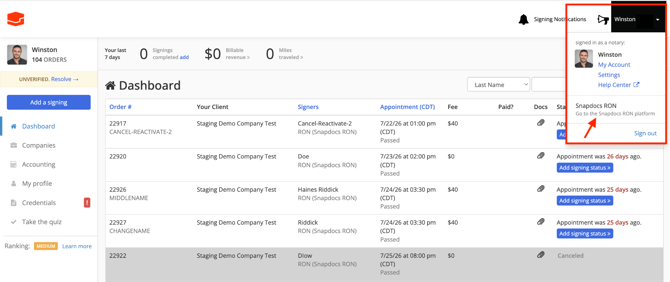
Snapdocs RON Portal
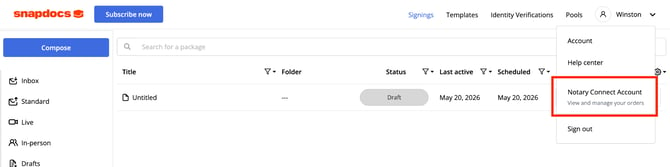
Navigation Across Platforms
- Navigate to Notary Connect from Snapdocs RON: Click on the avatar icon to see Notary Connect Account in the dropdown menu. If you have multiple roles, you will see “Notary Connect - [Role] Account” for each type of role a user has.
- Navigate to Snapdocs RON from Notary Connect: Click on the avatar icon to see Snapdocs RON Account in the dropdown menu.
Signing up
- Signing up for Notary Connect: you already have a Notary Connect notary account, so there is nothing to sign up for. If you open a Notary Connect sign-up link, you will simply be taken to your Notary Connect dashboard.
Credentials
- If you haven’t added your RON credentials or Snapdocs RON Proof of Training to your Snapdocs Notary Connect profile yet, review this article for how to complete this step.
Linking Accounts with different emails
- Link accounts by changing your Snapdocs RON email to your Notary Connect account email: You won’t be able to link your accounts this way. You’ll receive an error message that your email is already in use. This will start on Friday 8/21 when we release Auth0. (Before then, we’ll auto-sync emails that are the same across platforms.) After Friday 8/21, reach out to support@snapdocs.com to ask them to link your accounts – indicate which email you’d like to use.