
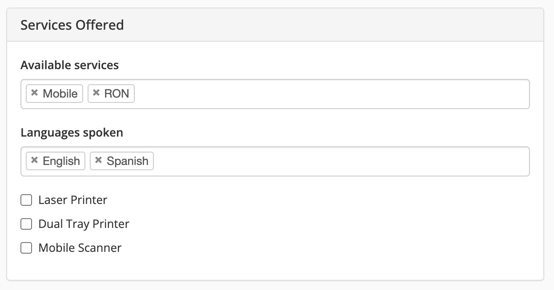
You can now tailor the types of signing opportunities you receive directly through your profile settings:
- Mobile Only: You will only appear in search results and receive notifications for Mobile signings.
- RON Only: You will only appear in search results and receive notifications for RON signings.
- Both Mobile & RON: You will appear in search results and receive notifications for all available signing opportunities.
Important Note: You must have at least one “Available Service” selected at all times.
Requirements for Offering RON
-
For "RON" to appear under your available services, you must be certified for RON with all relevant, unexpired credentials uploaded to your profile:
- Standard Commission
- RON Commission
- Digital Certification
- Proof of Training
- E&O Insurance
- For “RON” to appear under “Available Services”, you must be certified for RON with all relevant credentials present & unexpired (Standard Commission, RON commission, Digital Certification, Proof of Training, E&O insurance).
- Already RON-Certified: If you are currently RON-certified on Snapdocs, "RON" has been automatically added to your Services Offered.
- Future Certifications: Whenever you become RON-certified, "RON" will automatically be added to your Services Offered.
- Customizing Your Preferences: Once "RON" is added, you have full flexibility to adjust your preferences. You may remove "Mobile" if you choose to focus exclusively on RON signings, or you can remove "RON" at any point if you prefer mobile signings only.
How to Adjust Your Settings
Step 1: Navigate to My Account and find the Services Offered section.Step 2: Select or unselect the services you wish to offer.
Step 3: Select Update Profile at the top of the page to save your changes.
How it Works with Orders & Outreach
- You will only appear in search results and receive notifications for available signings for the “Available Services” you have selected
- If you only have “Mobile” selected, you will only appear in search results and receive notifications for Mobile signings.
- If you only have “RON” selected, you will only appear in search results and receive notifications for RON signings.
- If you have both “Mobile” and “RON” selected, you will appear in search results and receive notifications for all available signings.
- To receive notifications about available signings, you must have “notify me when there are available signings in my area” marked as On in your Account Settings.
